Multiply JFD's email revenue by using these emails we've created for you
0
Emails Written
0
Live Campaigns
0
Open Rate You'll Average
$0
Cost to You
SCROLL
Seriously... Put it in 2x
(I explained everything in here)
Everything you need to turn signups into deposits. Ready to launch.
The 3 reasons you are not making way more money through emails
That means a lot of your traders are not even seeing what you send them.
The promotions tab is one step away from invisible. If your emails land there instead of the primary inbox, most people will never open them.
Less people seeing your emails = less deposits. Simple as that.
Go through the last few emails you sent.
Do they talk directly to the trader like you actually want to help them? Or do they read like a corporate announcement that nobody asked for?
This costs you more than you think. The people reading these are real humans. If you're not helping them, they stop trusting you.
Less trust = less deposits.
This is happening because you are sending the same email to everyone.
Someone who just signed up should not get the same email as someone who has been trading with you for 6 months. A person who hasn't verified yet shouldn't be getting promotional campaigns. But right now, they are.
There are specific customer flows that can tie down to the exact individual. How long they've been trading, their deposits, country, region, trading pair.
The more targeted the message, the more money it makes.
Right after someone signs up, they haven't verified yet. These emails are designed to get them to complete KYC so they can actually start using the platform.
Send: 24 hours after registration, if KYC not completed
Subject: your trade quo account is 90 percent done
Preview text: One step left and you are cleared to trade.
[First name],
You registered for JFD. That part is done.
The one step remaining is identity verification. Without it, your account exists but cannot be funded or used for live trading.
Verification is there because JFD is regulated. VFSC License 17933, FCA, and CySEC all require it. Not to make the process harder. To protect you.
Verified accounts have segregated fund handling, access to the full compliance framework that comes with a licensed broker, and standing if anything is ever disputed on a deposit or withdrawal.
Right now, verified JFD traders are trading forex, metals, indices, energies, crypto, and stocks on MT4 and MT5. They are using the multi-asset account for multi-asset CFD trading. They are moving funds in and out on transparent withdrawal processing with no broker-side fees.
All of that sits on the other side of one document upload.
It takes most traders under ten minutes.
Talk soon,
JFD Team
Send: 3 days after registration, if KYC still not completed
Subject: why we need your documents before you can trade
Preview text: This is not bureaucracy. Here is exactly what it protects.
[First name],
A lot of traders see identity verification as a friction point.
It is worth explaining why it exists and what it actually does for you.
JFD is regulated under multiple regulated entities. Every regulated broker is required by its licensing bodies to verify every trader's identity before allowing live trading. This is a legal requirement, not a preference.
The reason regulation exists is to protect you. Verification confirms that your funds are connected to your identity. If there is ever a dispute about a deposit, a withdrawal, or account access, your verified identity is what gives you standing.
It is also what allows segregated fund handling to apply to your account. Without verified status, your account cannot access the protections that regulated trading requires.
The process takes under ten minutes. You need a government-issued ID and proof of address. Upload both, and your account is ready to fund and trade.
Verified JFD traders are running live positions on forex, metals, indices, energies, crypto, and stocks. Some are on the multi-asset account trading gold at zero spread for 90 percent of the day. Others are on the Standard account for simpler all-in pricing.
None of it moves forward without verification.
Talk soon,
JFD Team
Send: 7 days after registration, if KYC still not completed
Subject: what verified trade quo traders are doing right now
Preview text: Your account is still open. Here is what you are missing while it sits unverified.
[First name],
Your account is still open.
Seven days in, the account exists but cannot do the one thing it was built to do. Let you trade.
Here is what verified JFD traders are doing right now while your account sits in pending status.
They are trading gold at zero spread on the multi-asset account. They are running strategies with up to leverage per regulatory tier on most instruments. They are moving funds in and out on transparent withdrawal processing with no broker-side fees. They are working off the MT4 and MT5 platforms with the full instrument range.
The minimum deposit to start trading is $1. That is it.
But before any of that is possible, your account needs to be verified. One government-issued ID. One proof of address. Under ten minutes.
If something stopped you from completing verification last time, a question about the documents required, a technical issue, anything, reply here and we will sort it out directly.
Otherwise, the link below takes you straight to the verification step.
Talk soon,
JFD Team
Now that they're verified, it's time to actually onboard them. These emails walk them through the platform, build trust, and get them to make their first deposit.
Send: Immediately after verification
Subject: welcome to trade quo, here is what comes next
Preview text: Over the next five days, you will see exactly what your account can do.
[First name],
Your JFD account is verified. That is the part most traders rush through without realising what it actually opens up.
Over the next five days, you are going to get a short series of emails. Each one covers something specific about your JFD account that matters before you place your first trade.
You will see how the four account types compare, how transparent withdrawal processing actually work behind the scenes, what zero spreads on gold mean for your cost per trade, and why the 200 EUR minimum deposit exists at all.
Nothing long. Nothing complicated. Just what is worth knowing upfront.
The minimum to fund your account is 200 EUR. That is not a typo. We will get into why that number exists and what it is really there for.
Talk soon,
JFD Team
Send: 4 hours after Email 1
Subject: what transparent withdrawal processing actually mean at trade quo
Preview text: This is the promise most brokers quietly break. Here is how it works here.
[First name],
Most brokers advertise fast withdrawals. Very few deliver on it when it matters.
JFD was built around transparent withdrawal processing for one reason. The number one fear new traders carry into their first deposit is not losing money in a trade. It is not being able to get their money back out.
Here is how it actually works on your account.
There are segregated client funds and transparent funding. JFD does not charge you to move money in or out. The only fees you might see come from third-party payment processors, and those are always disclosed before you confirm.
Withdrawals process instantly on supported methods during business windows. Standard verification applies on first withdrawal, the same way any regulated broker handles it.
The reason this matters is simple. The ability to withdraw without friction changes how you trade. You size positions based on strategy, not based on anxiety about whether the money will come back out.
Talk soon,
JFD Team
Send: Day 2, morning
Subject: four accounts, one of them trades gold at zero spread
Preview text: RAW, Standard, ZERO, LIMITLESS. Here is what each one is actually for.
[First name],
JFD runs four account tiers. Most traders pick the wrong one for how they actually trade and pay for it on every single position.
Here is the clean breakdown.
RAW Account
Spread from 0.1 pips. Commission $3 per side per lot. Leverage up to 1:1000. Best for active traders who want raw pricing without going all the way to ZERO.
Standard Account
Spread from 0.4 pips. Zero commission. Leverage up to 1:1000. Best for traders who prefer all-in pricing and hold positions longer.
ZERO Account
Zero spread on roughly 14 instruments including gold for about 90 to 97 percent of the trading day. Commission $4 per side per lot. Leverage up to up to regulatory limits. Best for scalpers and gold traders who live on tight spreads.
LIMITLESS Account
Spread from 0.6 pips. Dynamic leverage up to effectively unlimited under stated conditions. Built for traders who want the highest possible leverage on qualifying trades.
Every tier starts from a 200 EUR minimum deposit. Every tier runs on MT4 and MT5.
The multi-asset account is the one most traders overlook. If gold is in your strategy at all, trading it at zero spread changes your cost structure on every round trip.
Talk soon,
JFD Team
Send: Day 2, afternoon
Subject: mt4 or mt5 and what is already in your account
Preview text: Forex, metals, indices, energies, crypto, stocks. All on one platform.
[First name],
Your JFD account runs on MetaTrader 4 and MetaTrader 5. You pick the one that fits how you trade.
MT4 is still the most widely used trading platform in the world. It handles custom indicators, Expert Advisors for automated trading, and one-click execution from the chart. Available on Windows, web, Android, and iOS.
MT5 is the next generation. More order types, built-in economic calendar, depth of market data, and the ability to trade stocks and futures alongside forex from the same terminal.
Both come on desktop, web, and mobile. Your login works across all of them.
What sits inside the platform matters more than the platform itself.
JFD covers forex pairs, metals including gold and silver, indices across the major global markets, energies, crypto, and stocks. One account. One login. All of it.
For most traders the setup on day one looks like this. Pick the account tier that matches your trading style. Download MT5. Set your pip value and risk per trade. Place a small test position on a major pair to confirm the execution feels right.
That is it.
Talk soon,
JFD Team
Send: Day 3, morning
Subject: the tools in your account most traders find too late
Preview text: Economic calendar, educational content, market analysis. Already yours.
[First name],
There are tools in your JFD account that most traders discover months after signing up, not at the start.
The economic calendar pulls live scheduled events. NFP, central bank decisions, inflation releases, PMI data. Knowing what is on the calendar before you enter a position is the difference between trading with context and trading blind.
The educational content covers everything from reading candlestick structure to position sizing to how leverage math actually works on your account. It is not a marketing tool. It is working reference material.
The market analysis section publishes regular commentary on what is driving the major pairs, metals, and indices. If you want a starting point before you open your platform in the morning, that is where to go.
None of this costs extra. It is part of the account you already have.
The traders who use these tools consistently are the ones who end up with structured risk management. The ones who skip them are the ones who end up guessing.
Talk soon,
JFD Team
Send: Day 4, morning
Subject: what six asset classes from one account actually tells you
Preview text: Awards come from publications. Reviews come from people with money on the line.
[First name],
Awards are selected by industry publications. Reviews are left by traders.
There is a real difference.
JFD holds a published client feedback and multi-jurisdiction regulatory coverage from verified traders. That number reflects the actual trading experience. How withdrawals held up, whether support responded when something went wrong, how the platform behaved under volatility.
Reviews on third-party platforms are not controlled by the broker. They come from people who had real capital in real market conditions and chose to document what happened.
You can read the full set on Trustpilot directly. The consistent themes: deposits and withdrawals move when they are supposed to, the multi-asset account delivers the spreads it advertises on gold, and support responds.
JFD has also been featured in Fortune, Variety, and Forbes. Press coverage matters less than what actual users report, but it is worth knowing the brand is not operating in a corner nobody has heard of.
Talk soon,
JFD Team
Send: Day 4, afternoon
Subject: what regulation actually protects on your account
Preview text: Four licensed entities. Here is what each one covers.
[First name],
JFD operates under a multi-jurisdiction regulatory stack. Each licensed entity covers traders in specific regions.
VFSC under licence number 17933. FCA. CySEC. .
That matters for one reason. Regulation is the mechanism that keeps client funds separated from the broker's operating capital. It defines how disputes get handled. It sets the legal framework you operate under as a client.
When you fund your JFD account, your capital sits in segregated client accounts. That is not a feature. It is a structural requirement of operating under these licences.
You can verify the licence status of any entity directly on the regulator's public registry. Every regulated broker should welcome that check.
Leverage on your account goes up to per regulatory tier on most instruments and effectively unlimited on the professional tier under stated conditions. High leverage is an intentional part of the JFD offering. It is also the single largest risk factor in trading CFDs. Size positions accordingly.
The current risk disclosure on the site notes that 59.18 percent of retail investor accounts lose money when trading CFDs.
Talk soon,
JFD Team
Send: Day 5, morning
Subject: the one dollar decision most traders delay forever
Preview text: The minimum to fund is 200 EUR. Here is why that number exists.
[First name],
The most common thing we hear from traders who verified their account and have not funded it is: I will do it next week.
Next week becomes next month. The market moves. Confidence drops. The delay extends.
Here is what most traders are actually waiting for. Certainty. They want to feel ready before they start.
That certainty does not arrive before the first trade. It arrives after the first ten.
The minimum deposit on JFD is $1. That is deliberate. It is not a marketing hook. It is there to remove the financial excuse entirely so the only question left is whether you actually want to trade or not.
Here is what a starter position looks like on the multi-asset account.
Fund the account with 200 EUR. Open MT5. Place one small position on gold at zero spread. Commission is $4 per side per lot, and you can size well below a full lot. Watch the fill. Watch the spread. Watch the execution. Close the position.
That is the whole exercise. Not to make money. To confirm the account works the way it was described to you across the last four days.
Transparent withdrawal processing are already set up on your side. If you want to pull the remaining balance back out after the test trade, you can. That is the point.
Fund your account and place your first trade
Talk soon,
JFD Team
This is where most brokerages completely drop the ball. They get the trader signed up, verified, onboarded... and then go silent. No value, no updates, nothing. It's the equivalent of going on a great first date, getting her number, and then ghosting her. And wondering why nothing happened.
This is where you start making your emails addicting. You give traders real value on a consistent basis so they keep choosing your platform over every other option. The 3 campaigns below are designed to do exactly that.
These can be used for the next 2 days or they won't make sense!
These can be used for the next 2 days or they won't make sense!
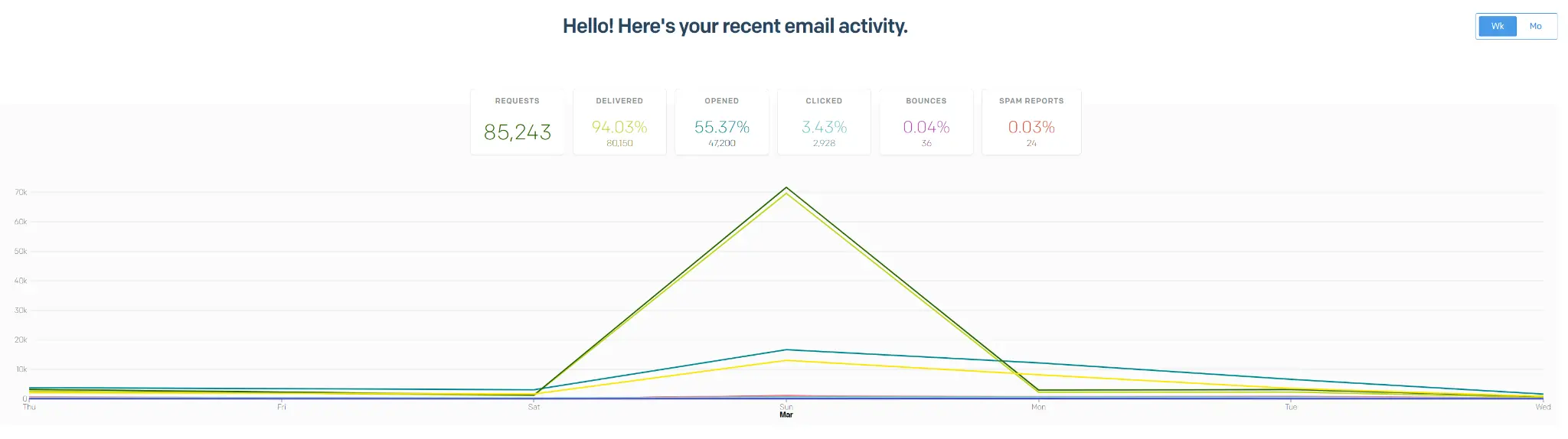
Most brokerages average a 20-30% open rate on their emails. We more than double that. We average a 55% open rate, which means over 200,000 people per month open our emails and are addicted to them. All while every email is reaching the individual traders of this broker.
Another video showing our results:
We will do the following for completely free:
I will personally audit your current entire e-mail process and tell you every single fix and point of improvement you should be making regarding email marketing, brand, direction and email tech
The stuff I just created? You do not have to worry about it. I will set it up for you fully. The campaigns, the flows, optimized and ready to launch. We do this within 24 hours.
ALL YOU NEED TO DO IS BOOK A 10 MINUTE CALL WITH ME
You walk me through your process. I give you a full audit and set everything up. Done.
I MEAN IT LIKE I'VE SAID IT,
LEAVE YOUR CREDIT CARD AT HOME
 Book a Call With Us
or email us at danilo@aimcompany.co
(and the process that has made our clients over 7 figures in deposits)
(we take care of the whole email marketing side)